Skip to content
Built for anime. Nothing else.

Same character. Every episode.

Most AI video tools drift after a few seconds. Milk & Ink locks your cast's identity with trained character LoRAs and a canon engine — across a full anime series, not an 8-second clip.

Drop in a Fountain script. Train your cast once. See the exact per-second cost before you click Generate. Walk away with a Premiere / Resolve / Final Cut timeline that's already cut.

Signed release manifests on every plan · Human reply within 24h

5 min
from signup to first render
1 canon
every shot stays on-model
Per-shot
cost shown on every take
75 ep
founder's own series, in production
  • Pilot Pack from $4,999
  • ≈ 2 episodes delivered in ~30 days
  • Free Reviewer + Viewer seats
  • LoRA character lock · signed handoff

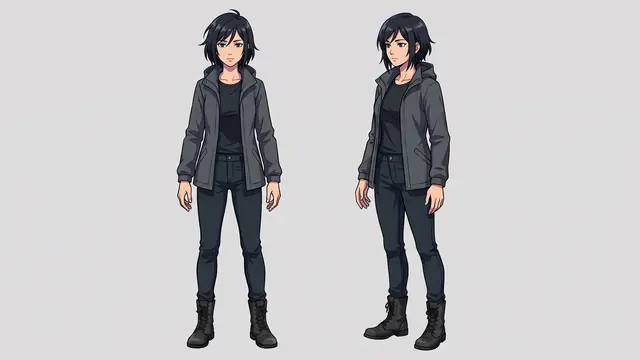
INSOMNIA · S1 — same character, four shots

Canon-locked via trained LoRA
Ryoko
Shot 01
Tokyo rooftop
Shot 01Tokyo rooftop
Ryoko
Shot 02
Subway platform
Shot 02Subway platform
Ryoko
Shot 03
Shrine steps
Shot 03Shrine steps
Ryoko
Shot 04
Apartment kitchen
Shot 04Apartment kitchen
Inside the studio

Preview-first workspace.
Everything in one canvas.

No context switches. Compose, render, review, and approve without leaving the frame you're working on.

SHOT 042 · TAKE 03
01:24:18:04
Preview
Ryoko · wide

Directing canvas

Preview shot under the composer. Drop start frame, describe motion, fire whichever video model fits your look — cinematic-anime, 2D-illustrated, or stylized.

Canon-locked cast

Character LoRAs lock faces across shots. Continuity lint flags drift before render.

Versioned timelines

Every render is a version. Fork from a favorite, compare side-by-side, pick a winner.

Review + provenance

Pins, threads, approvals, signed provenance manifests — distributor-ready out of the box.

Why a studio, not a generator

Stop rolling dice. Start producing.

Generic AI video is a slot machine — beautiful frames, random results. Milk & Ink is a production system: canon-locked characters, repeatable shots, a real workflow. Not a prompt box.

Without Milk&Ink
  • Every shot is a coin flip — beautiful, random, unreproducible.
  • Character identity drifts by shot 10. Backgrounds morph between takes.
  • Failed re-rolls still bill. $30 of credits for 4 seconds of usable footage.
  • No shared state. Support is a chatbot. Your studio runs on screenshots.
With Milk&Ink
  • Every shot is repeatable. Same character, same canon, every render.
  • Trained LoRAs lock identity across an entire production, not just one clip.
  • See the exact per-second cost before you click Generate. No markup, no surprise bills.
  • Every email replied to within 24h, by a human. Signed by Elijah.
In production now

INSOMNIA — produced shot-by-shot on Milk & Ink Studio.

A 75-episode anime series, made on this exact platform — the studio is the show. Every frame below is the actual lead character (Ryoko), rendered through the same canon engine, character LoRA, and frame-anchor continuity that ship in the product.

Apply to be a design partner
INSOMNIA · S1Ryoko
Canon-locked
S01

Tokyo rooftop · golden hour

S02

Subway platform · night

S03

Shrine steps · rain

S04

Apartment kitchen · dawn

Cinematic-anime · Flux LoRA + Kling 2.6 Pro

What studios build with M&I

From first draft to final release.

Original IP — pilot to streamer

Lock your cast with trained LoRAs. Script → shot list → Canon-checked generation → NLE export. A solo director shipped a 22-min pilot in 4 weeks.

Episodic series production

The Pipeline portal auto-parses a Fountain script into an episode tree, batches generation for every shot, then compiles approved versions into a Premiere timeline.

Webcomic or light novel → animated pilot

Feed in your source art and script pages. Canon locks the cast to your reference sheets, so the pilot reads as your IP, not a generic AI look. Pitch a real episode, not a mood board.

The editor’s moat

Do the AI work in M&I.
Finish in your timeline.

Traditional editors don’t want another browser tool permanently replacing their workflow — they want AI to handle the heavy lifting so they can finish in the software they already know. Every approved scene in M&I exports a clean, cut-ready timeline in your native format. Hit Export. Open in Premiere, Resolve, or FCP. Done.

Adobe Premiere
.xmeml
DaVinci Resolve
.edl
Final Cut Pro
.fcpxml
OpenTimelineIO
.otio
Clean cut-list with frame-accurate timecodes

See your IP animated in 15 minutes.

Have a script, a web comic, or a series bible? We’ll turn a scene into a continuity-locked animatic — character-consistent, export-ready — before you finish your coffee. No waitlist.

Built for production

Everything a studio needs.
Nothing they don't.

Canon Bible

Characters, locations, and style rules with reference images. Every render pulls from it automatically.

  • Trainable character LoRAs
  • Location reference plates
  • Palette & style constraints
  • Reusable across projects

Canon-locked consistency

Character identity stays on-model across every shot. Pull the last frame of shot 12 into shot 13 with one click.

  • Trained Flux LoRAs lock identity across full seasons of production
  • Continuity engine catches drift on every render
  • Drift caught? Free re-roll on us
  • Start + end frame interpolation

Scene Planner → Release

Paste a script, get a shot list. Move shots through Planned → Draft → Review → Approved. Ship with signed provenance.

  • Script → shot list in 30 seconds
  • Board + Timeline views
  • Frame-pinned review comments
  • Signed delivery manifests

Every NLE, every major model

Export to Final Cut, Premiere, DaVinci Resolve, or OpenTimelineIO. Swap render models as they evolve.

  • Runway Gen-4 · Veo 3 · Kling 3 · Seedance 2 · Wan 2.1
  • Nano Banana 2 for identity locks
  • ElevenLabs v3 character voices
  • Public API + webhooks
Workflow

From idea to episode in four steps.

01

Build your Canon Bible

Upload character references, define locations, set palette and style rules. Your studio's visual law.

02

Plan your sequences

Break episodes into sequences and shots with action, camera, and emotional beats. Drag-and-drop shot board.

03

Generate canon-aware drafts

One click bundles canon refs, prompt, and rules into a packet. Choose a provider, hit generate.

04

Review, approve, release

Continuity engine flags drift. Director approves. Package ships as a release manifest.

New in the studio

The studio keeps getting sharper.

Shipped, not roadmap — every capability below is live in the product today, built with our first design partner's series in production.

Dailies, like a real studio

Review two takes head-to-head with one shared transport — no sync drift, no juggling players. Drop frame-pinned notes (“eyeline off in this corner at 00:02”) and see who else is in the room, live.

A receipt on every take

Every version shows exactly what it cost. The forecaster projects what finishing the project will run, and hard spend ceilings mean a runaway loop stops itself — never your card.

Bible · Story

Story Planner

Premise → arcs → scene specs → beats. Structural narrative planning that feeds the shot list, so the canon knows why every shot exists.

Included on all tiers

Director Copilot

A context-aware helper on every surface — prompt iteration in the composer, spend reasoning on billing. Included on every tier, audit-logged.

Beta

Manga Mode

Paneled pages straight from your script — storyboard the season as manga before you spend a frame of video budget.

Distributor-grade

Signed delivery

C2PA-signed provenance on release manifests, plus Premiere, Resolve, Final Cut and OTIO timelines that arrive already cut.

Why Milk & Ink

Every other tool stops at the clip.
We built the studio around it.

Individual video generators are commodities. What’s rare is the production layer above them — canon, continuity, workflow, and distribution that makes a full series possible.

Feature
Milk&InkStudio
Focalclosest competitor
RunwayGen-4
Pika2.2
AdobeFirefly
Canon Bible — characters, locations, world rules
The source of truth that all downstream generation references. No competitor has this.
Trained character LoRAs (identity lock across shots)
Train once. Every render of your lead character draws from the same LoRA.
Multi-provider routing (Veo 3, Kling, Wan, Runway, Seedance)
Focal supports multiple models but no fallback chain. M&I routes by health + cost.
Script → Shot pipeline (Fountain → episode tree)
Continuity engine (preflight + reactive vision-model)
Catches drift before it hits review. No other tool does this.
Human review + approval workflow
NLE export — Premiere, Resolve, Final Cut, OTIO
Per-render cost preview before clicking Generate
You know the exact dollar cost of every shot before it hits the provider.
Gemini Canon Intelligence (auto-extract from series bibles)
Provenance manifest + audit ledger (C2PA-style)
Free Reviewer + Viewer seats (unlimited)

Full support Partial / limited Not availableLast updated June 2026.

The thesis

There is no god model. Orchestration wins.

No single AI video tool wins on quality, control, cost, and reliability at once for anime production. Veo is photoreal but censored. Kling has motion but queues for hours. Pika is fast but drifts. The platform that ships your series is the one that orchestrates the whole pipeline — script to render to release — and routes around each model's weakness. That's us.

Continuous workflow, not a tool chain

Script → storyboard → shot list → render → review → release. One canvas. No context switches, no exporting to Audacity for music or CapCut for stitching. Every step inherits canon and audit state from the last.

Provider-agnostic by architecture

Different anime looks favor different engines. Today: Runway Gen-4.5, Veo 3, Kling 2.5 / 2.6 / 3, Seedance 2, Wan 2.1 — all on the same canon-aware packet. Tomorrow: whatever ships next, with a ~200-line adapter. You're never trapped on a model whose roadmap stalls.

Structured shots, not slot-machine prompts

A shot in Milk & Ink is structured data — camera, character, setting, style, palette, continuity ref — not a paragraph of prose. The renderer turns it into pixels. Edit one field, regenerate without re-typing the prompt. Hybrid 3D + generative, the way the post-pure- prompt direction is going.

“There is no god model.”— Justine Moore, a16z (@venturetwins)  · “Classical 3D for control, generative AI to finish.” — Bilawal Sidhu (@bilawalsidhu)

Why not just use Runway directly?

Because your studio isn't
a prompt playground.

Anyone can generate a cool clip. Shipping a season with canon-consistent characters, director approval gates, and a release manifest your NLE can actually use — that's a different tool.

Canon-aware generation + visual audit

Every generation packs character refs, palette, and style rules into the prompt. Then a vision model scores the result against your canon and flags what drifted — hair, costume, facial features. Drift gets caught, not shipped.

Visual continuity score (0-100) with per-character drift notes, on every version.

Drift caught? Re-roll is on us.

Every other AI video tool bills you whether the render came back right or wrong. We don't. When the continuity engine flags FAIL on a draft, you get a free re-roll within 30 minutes — capped at 2 per shot per month so the safety net isn't a treadmill.

Higgsfield refunds zero after one test render. Runway billed re-rolls eat your monthly credits in an hour. Not here.

Pricing transparency before you click

Real per-second cost shown on the Generate button — see exactly what each render costs before you spend it. No surprise credit burn, no "~$1 = 25 credits" bait-and-switch, no opaque "computing seconds."

Real per-shot cost on every model: Wan 10¢/s, Kling 2.6 24¢/s, Veo 3 40¢/s.

Provider-agnostic architecture

Different anime looks call for different engines — cinematic-anime, 2D-illustrated, painterly, stylized. One prompt packet routes to whichever model nails yours: Runway Gen-4, Google Veo 3, Kling 2.5/2.6/3, Seedance 2, and Wan 2.1 today — all with canon threading. As new providers ship, your studio gets them without rewriting a single shot.

Clean adapter interface; add a new provider in ~200 lines of TypeScript.

Production-grade workflow

Shot board, director approval gates, frame-level review comments, release packaging. Not a prompt playground — the tool your studio actually ships with.

Built around how Pixar, Aardman, and your favorite studios operate today.

Your data, your control

Canon, characters, and generated shots live in your Supabase project. We never train on your content. Enterprise customers run the full stack inside their own cloud — we never see a frame.

Row-level security on every table. Private cloud deployment available.

Production roadmap

INSOMNIA ships on a published calendar.

Every feature in this product exists because we hit a wall building INSOMNIA and shipped the tool that fixed it. Where we are right now:

Pre-vis

S1 E1–3

in progress

First episode

S1 E1

targeting Q3 2026

Season 1

25 eps

open production calendar

Launch promo — first 10 annual subscribers

50% off year-1 on annual Production or Studio plans, on top of the standard 30% annual discount. Auto-applied at checkout — no application required, no waitlist. Closes when 10 commitments are signed.

Pick a plan
Pricing

Subscribe by the month. Or buy by the show.

Two ways to fund production — a continuing-creator subscription or a one-time scope package. Below are the two most common picks. The full ladder (Pro · Production · Studio · Enterprise + four scope packs) lives on the pricing page.

Continuing creators

Most Popular

Production

$4,999per month

For solo founders and small studios shipping a series.

Get Production

Pipeline portal — script → episode automation

  • Drop a Fountain script; auto-parse into Series → Season → Episode tree
  • One-click batch generation for every shot in an episode
  • Auto-TTS dialogue + auto-lipsync when video lands
  • Compile approved versions into Premiere / Resolve / FCP / OTIO

Production-scale quotas + distributor handoff

  • 1,200 drafts + 175 finals / month
  • 12 character LoRA trainings / month
  • $800 / month additional generation buffer (auto-pauses at the cap, never billed extra) · up to 15 billable seats · unlimited free Reviewer + Viewer
  • Provenance manifest signing (C2PA-style)
  • Tamper-evident audit ledger export (JSON)
  • Advanced canon analytics + coverage scorecards
  • Managed-only — keeps your spend ledger, provenance, and audit chain authoritative
  • Everything in Pro + Pipeline portal

Project-based work

Best Value

Half-Season

$74,999one-time · 4,500 finals

A real arc. The cleanest path to a streamable cut.

Buy Half-Season
  • 4,500 finals + 22,500 drafts · 36 character LoRAs
  • ≈ 15 22-min episodes · up to 36 identity-locked main characters
  • 90-day delivery window
  • Pipeline portal · auto-TTS · auto-lipsync
  • Episode lock gates · canon coverage scorecards
  • Signed release packages for distributor handoff
FAQ

Questions? We have answers.

Yes — anime is the whole focus, not a checkbox next to other formats. The canon engine enforces your show's style rules (cel-shaded, 2D-illustrated, painterly, whatever your look is), and character LoRAs are trained and tuned for anime rendering, not general photoreal video. Camera moves, pacing, and shot grammar in the Composer default to anime conventions, not live-action coverage. A couple of the underlying video models are technically capable of photoreal output — that's an artifact of how they're built, not something we market or route you toward. Milk & Ink Studio is built for one kind of production: anime.
Launch promo — first 10 annual subscribers

50% off year-1 on Production or Studio annual plans. Stacks with the 30% annual discount. Auto-applied at checkout — no form, no waitlist.

Claim it
5 minutes to your first render

Direct your next production.
Keep your characters.

Sign up, build your Canon Bible, generate your first shot. Pick the plan that fits your production — every tier self-serves straight through checkout.

No vendor lock-in — BYOKSigned release manifests includedHuman reply within 24h